Websites are the new way of reaching your desired customers. Internet has become new market where anyone from across the world can sell anything. To build a successful and professional website you have to build it at WordPress. WordPress is the perfect platform for making website. Search engine visibility WordPress plays an important role here.
There are companies which provide ready-to-use WordPress themes where you only have to install and add content into it. But while buying WordPress themes, you have to make sure that its SEO friendly or SEO optimized.
Now why is it so important? SEO is the way of confirming the way of getting more views on your website. More viewership is equal to more profit. SEO stands for Search Engine Optimization. This itself is enough to know the importance that it holds.
SEO optimization helps in maintaining the place of your website on top suggestions on search engines. If someone searches for similar stuff, your website name and URL will appear on top suggestions on any browser. Whether it be Google Chrome or Mozilla Firefox, your website must be browser friendly too.
But you need to make sure that the Search Engine visibility WordPress is not working while creation of website. If it stays visible, the SEO will inform the search engines about the website. But because its not ready yet, it will lack behind in the race. This will give your website a lousy start.
Even when you are making some big changes in the website, you would want to be invisible. When you make such changes into websites, you need some space. If viewers keep crashing on your website it can create trouble. That’s why search engine visibility WordPress is a must to know about.
How To Disable Search Engine Visibility WordPress?
- By WordPress:-
This is one of the easiest ways to disable Search engine visibility WP. It will prevent the WordPress account itself from crawling your website. When your website is not ready, the WordPress account will try to make it visible as programmed. But you can stop it.
There’s a file named ‘robots.txt’in the directory of WordPress. Now you need to go into the directory and deactivate it. That’s it! Let’s get into it step by step!
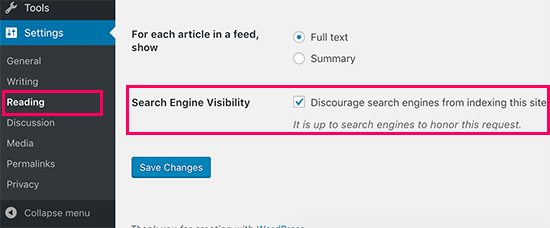
First go to your admin WordPress account and log into it. Go into the Dashboard on the left side of the window. Then scroll down to Settings tab and from the drop down click on ‘Readings’.
On the window few option will appear. There find the option for ‘Search engine visibility’. You will notice a box in front of it saying ‘discourage search engine visibility’. Click on the box and select it. Then click on save changes and it will be done.
This is the easiest way to prevent search engine visibility WordPress. This will give the WordPress account instructions to edit the robots.txt file on its own.
- Manually:-
You can disable search engine visibility WordPress manually too. The ultimate aim is to edit robots.txt file. That you can do manually as well. But for this you will need to navigate to FTP.
First of all go into the FTP client that you have. There find the folder for File manager. Here all of the files related to your WordPress website will be stored. Now go to Root Directory folder. This folder can also be named as public_html. Here you will get the robots.txt file.
If you can’t find the file, you can create an empty folder named as robots.txt. Now right click on the folder name and from the drop down click on ‘Edit’. Then the window will appear. There you will have to write the ‘disallow’ code. This will disable the search engine visibility WordPress manually.
After this you have to note down the syntax as it is. Its because the code that you wrote on robots.txt file will be case sensitive.
- Password:-
This is another way to protect your website from crawlers. You can just password protect your website. This way even if someone searches for your website, they won’t be able to access it. There are two ways to put a password on your website.
First is by using Control panels. For this go into admin panel of your hosting platform. There find the directory for Password protection. Then the panel will appear on the window. It will have directory name, user name and password. There you will have to enter the name of root directory. Then enter the username and password for your WordPress website. After that click on protect option. This will protect your website with a strong password. If your root directory’s name is public_html then it has to be empty.
Second way is by using WordPress plugin. Yes! There is a WordPress plugin for preventing search engine visibility WordPress as well. You will find a lot of WordPress plugins for this in the plugin section. But among all of them Password Protected is said to be the best. Its tried and tested by the users around the world. Also it keeps updating itself like WordPress. So after navigating to Plugins from dashboard, you have to install and activate the plugin. Then go to Settings and find the Password Protected plugin in installed plugins list. Then go to the edit section of the plugin and make changes you want in it. This will prevent search engine visibility WordPress.
- Remove the page:-
Even if Google has already crawled into your website, you can still prevent the search engine visibility WordPress. For this you will have to remove the page from SERPs.
First from your WordPress account set up Google search Console. Then go to legacy tools and into reports click on the removal option. Find Temporarily hide button and click on it. This will create an empty space for the website’s URL. Choose the option for ‘Clear URL from cache temporarily’. Then click on submit to finish the process.
This way you can prevent Search Engine Visibility WordPress!