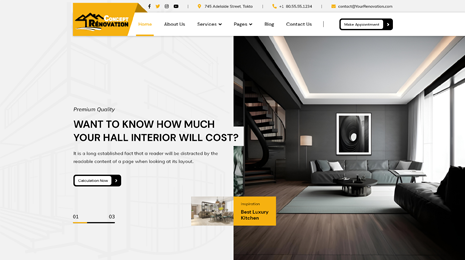
Once you are done with the creation of your WordPress Web page, the next thing you want to add is the navigation menu. The navigation menu you add to your website makes browsing it much easier. They are helpful to direct the users wherever you want them to go.

How To Add Navigation Menu WordPress?
A navigation menu is a list of links that are styled accordingly to match the theme. These links can be related to internal pages or posts on your site. They may also be external to other sites such as Twitter, Facebook, etc.
Depending on the theme, the place of your navigation menu will change. Mostly, the main menu is commonly found on every page and posted on the header of your site. These menus are expected to include only the most important areas of your site. Every post and page doesn’t need to be included. Nowadays, there are many WordPress themes providing some additional locations for placing menus. Footer is one such location. Thanks to the footer menu, a user doesn’t have to go to the top of your page again to find the menu options to decide where he/she needs to go next on your website.
Ways To Add Navigation Menu WordPress
If you are looking for ways that will help you add the primary navigation menu or footer navigation menu in WordPress website, you don’t have to go anywhere as this guide will let you know the ways to add navigation menu WordPress and show them on different locations on your website to your viewers.
As the navigation menu serves as a roadmap to the visitors to your website, it is one of the most important and necessary components of any website.
Adding Primary Navigation Menu:
The primary menu is the basic menu of the Menu Editor, it’s the part you use for creating the navigation menu. To go to the Editor, you need to follow the path through WP Dashboard, Appearance, Menus, Menu Editor.
As a WordPress user, you are authorized to tweak the menu items and edit them. If you don’t choose to edit the theme, it will enlist the pages of your site as menu items.
To add a primary navigation menu in WP, just open up the Menu Editor and click over the Create a new menu button. Fill in the name of your menu. This name will be seen only by you but not the audience. The menu structure varies with the theme you are using. If not much, but there is at least the primary option available for you.
Select Primary location if you want to add a primary navigation menu in WP. You will also be able to change the location of the menu in the future, so don’t worry about that. You can spot the list of items on the opened screen and from those, you need to choose the pages that you want to add to the menu.
To add navigation menu WordPress, Once you choose and add the needed pages to the menu, the next step is to rearrange them. They get arranged in the order you add them, by default. However, you can easily relocate them in a sequence preferred by you by simply dragging and dropping. The same process can be repeated for categories and posts as well.
For adding custom links to the primary navigation menu, click on the Custom Links Tab to expand it. Here you will see URL and Link Text boxes that you have to fill. After you have filled in the required details, then click on Add To Menu.
As soon as you have added a primary navigation menu to your site, you will see that the page title or the post added to the menu is utilized as the link text. You can always change that text and replace it with some other one. Just toggle the menu item ( or click the arrow given on the right of the item) the navigation label of which you need to edit. Just enter the preferred text in navigation and save changes.
Add navigation Menu WordPress Site’s Footer
Apart from header, you may also choose to add navigation in the top WordPress themes website’s footer. Or you may even choose to embed it in the sidebar or other widgetized areas of your site.
The footer area is being quickly noticeable and of frequent use, adding the navigation menu to the footer can be very effective as your audience will be able to see the menu when they reach to the bottom of your page and there is no need for them to again go to the top in search of the menu.
For this, find a widget named Custom Menu Widget. Go to the WP Admin Dashboard > Appearance > Widgets and add Custom Menu Widget to a footer.
Then, you have to enter the title and select the menu that you want to showcase in the footer area. That menu may be the existing menu available on your website or it may be completely different created for that widget. After it is done, click the Save button. Technically, we are done with the footer navigation menu part.
However, you can still customize it further and use styling options to give these menus a fresh look and feel. Normally, premium WordPress themes use CSS controls for decorating navigation menus.
But if you have no idea about codes or CSS, seeking the help of plugins is a much better idea.
Max Mega Menu
It is among the most reliable and feature-rich plugins for WP menu management and customization. This plugin allows you to have full control over the navigation menu as you can style them to match the overall design of your website. There are built-in CSS3 transitions in this, multiple menu support, mega menus, customized styling options, Font Awesome, custom icons, and tons of other features and options.
Custom Menu Wizard Widget
You can get highly benefited from the optimal menu management system that Custom Menu Wizard Widget brings. It is ready to cater to the specific needs of its users helping you with the styling and restructuring of the site menus.
To Conclude

Hope this guide of to add navigation menu WordPress has thrown enough light and enlightened you with some ways that will help you to add a navigation menu in WordPress. Along with this also have a look at WordPress Bundle and get your website a stunning theme.